Mini-review of the ASUS ROG Zephyrus G15 GA502IU (Ryzen 7 4800HS, GTX 1660 Ti Max-Q)
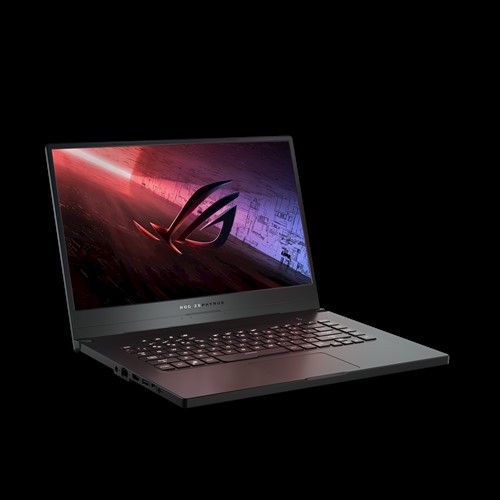
This post is the extended version of the review of the laptop posted on the store’s website. The review on the store’s website had to be cut down significantly due to the review length limit.
Preface
Right away it’s worth noting that this review is mostly focused on the nuances and flaws of this particular model. The fact that there are more of them listed than the pros doesn’t mean the model is simply awful. My goal is to provide the maximum possible understanding of all the nuances that I managed to discover myself. It is up to the reader to further judge how important each nuance is.
And if you want to see this laptop being praised - welcome to YouTube, where there are a bunch of reviews proclaiming the laptop lineup on the Ryzen 4000 series to be the greatest event of the decade.
Pros
In general
- Powerful CPU
- Decent GPU
- Not bad cooling
- There is a version without Windows (a difference of ~11% in price)
- It comes with a card for ASUS’s “premium” service. Worth clarifying that during the “quarantine” it barely functions at all.
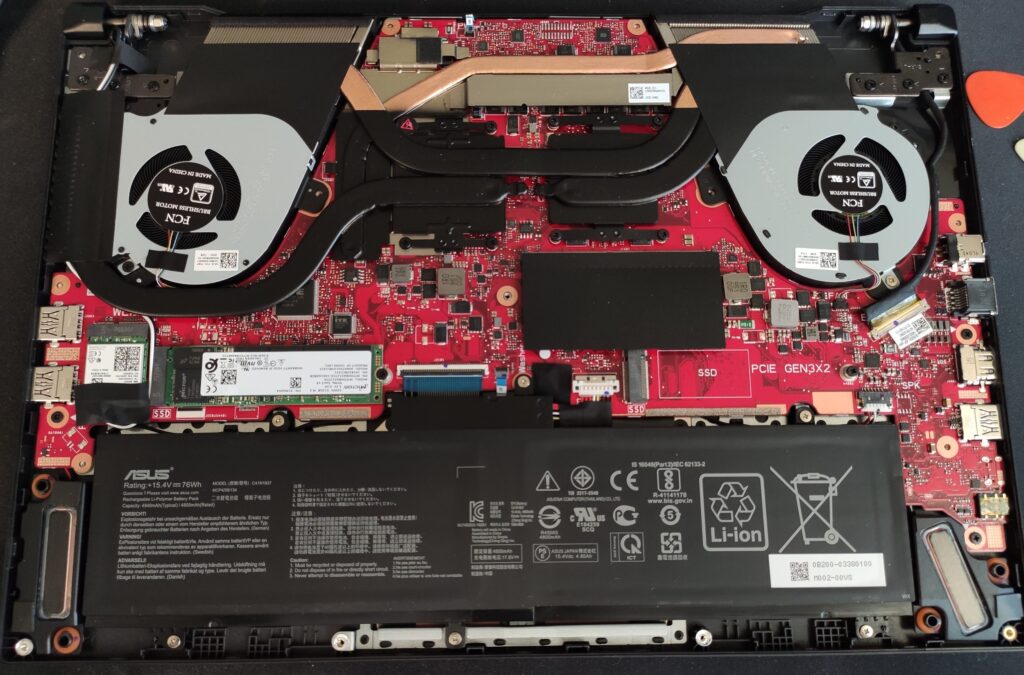
True at the time of writing
- It was released and appeared in Russian stores earlier than anywhere else
- It costs RELATIVELY sane money (for a new item in this price category)
Cons
For everyone
- In this particular model the 16 gigabytes of memory come as two modules, one of which is soldered to the board. It would have been better if a single 16 GB module were used - then one could add a second one and get 32 gigabytes of dual-channel memory. In other words, an upgrade is possible, but far from optimal.
- You need to remember that a Max-Q GPU is not something even cooler, but quite the opposite - a version clocked lower to reduce power consumption.
- The two screws of the back panel are of different sizes. If you’re going to take it apart - remember which screw was where, otherwise you risk damaging the case. One of the YouTube reviewers screwed the long screw in where the short one was supposed to go and got a bulge on the case next to the touchpad. The bottom part of the case is plastic, which makes the chance of damaging it even higher.
- No webcam. Not a very important downside for me personally, but in the era of remote work it can matter quite a bit.
- The screen is decent, but not perfect. Depending on the unit, backlight bleed may be visible to varying degrees on a black background. It doesn’t bother me, but there are people who really dislike it.
- The specifics of the cooling system exhaust. For some this will NOT be a downside. But some people prefer the exhaust to go up near the display, or at least out the back only. This laptop releases air at the back and on the right side - it heats up whatever is standing to the right of it quite noticeably (a mouse, for example). On your lap it can also be uncomfortable depending on the position. Though this will most likely be the case with almost any reasonably powerful laptop. Either performance, or cool knees.
- The screen opening angle is not very large.
- The keyboard is somewhat of an acquired taste. It can be relatively hard to get used to due to the somewhat “shifted”, asymmetric layout. It only affects those who don’t look at the keyboard while working.
- Under full load the power adapter gets very hot.
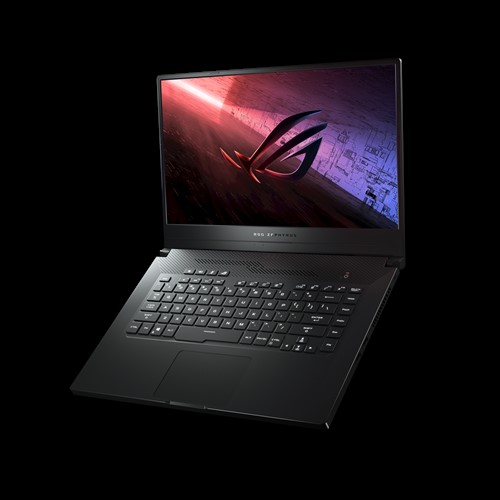
Maximum screen opening angle
For advanced users
- The SSD from Micron ships with OEM firmware, which rules out the possibility of updating it with the utility from Micron even if such an update is released. The only way to get an update would be if ASUS releases one (unlikely).
- The same proprietary services like Armoury Crate. Without them the OS itself won’t react to the hotkeys controlling the backlight and the fans. The latter can be compensated with RyzenAdj or its frontend Ryzen Controller (Gitlab), the former - most likely by nothing.
For those using Linux
Either on the very latest kernels, oron the kernels built by Manjaro (20.0.2, 20.0.3) it is possible with this laptop to end up in a situation where the built-in SSD drops out of the system completely. The kernel starts complaining about access errors almost immediately after the installer requests the list of partitions, and the SSD stops showing up everywhere until the power is turned off (a reboot doesn’t fix the problem). Because of this I first thought my laptop had a defective SSD.It’s not certain that the SSD problem is tied to the specific kernel version - possibly,Most likely it’s a quirk of the Manjaro build,or of Calamares (the local installer). But the very fact that the SSD disappears under certain circumstances is not very pleasant and is something of a warning sign.
UPD: Kernels 5.0.x, 5.3.x, 5.4.x on Mint didn’t cause any problems with the SSD (although the 5.0.x kernel lacks iwlwifi support for the required chip). On 5.7.x in Gentoo everything works stably except for some vendor features like the Armoury Crate alternative, which is fixed by the patches described in the addenda below.- All the control over the keyboard backlight, the fans and the rest works
through the proprietary Armoury Crate, for which there is currently in Linux
no means of control. That is, in Linux the keyboard backlight won’t work, there will be no way to switch the cooling system operating modes and the performance profiles(CPU schedulers and hacks for Ryzen like RyzenAdj can still be used).
UPD: See the updates at the bottom of the post. - The battery health preservation function (charging up to 60 or 80 percent),
apparently, is also controlled almost entirely in software by the
“My ASUS” application.
In Linux charging always goes up to 100% even if you had previously set a different limit in Windows.On laptops where this is configured in UEFI/BIOS such functionality works in any system.
UPD: See update #4 at the bottom. - If you want reliable operation in Linux - perhaps it’s worth waiting for other laptops on the Ryzen 4000 series from MSI or the new Lenovo models - the latter outright promised Linux certification.
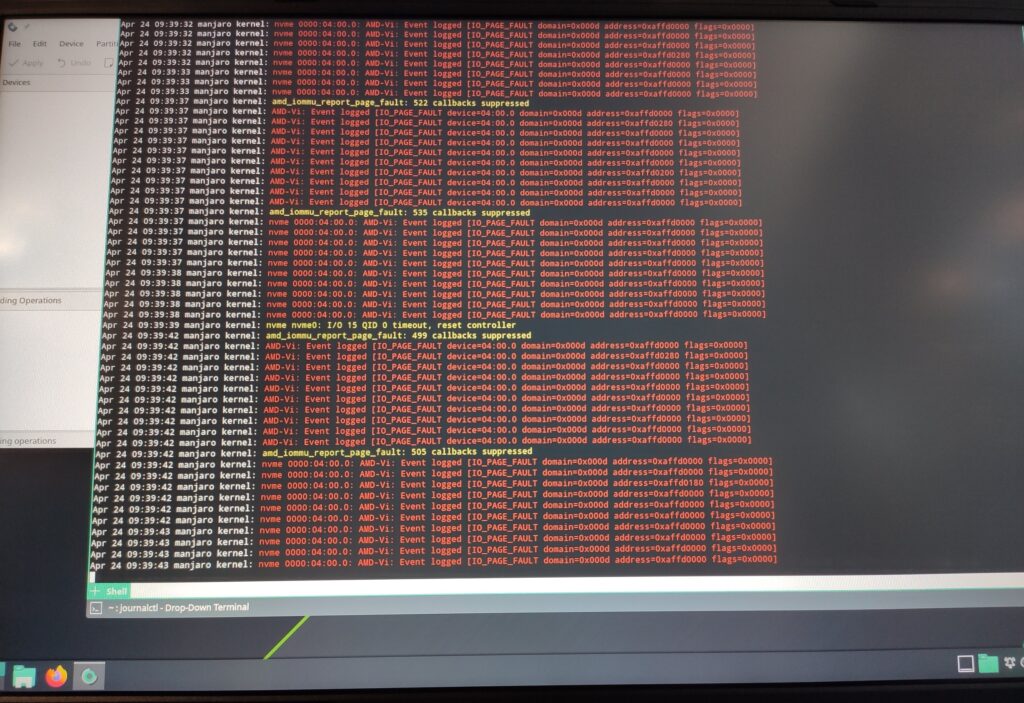
SSD problems in Manjaro 20.0.2
If you have run into a similar SSD problem in Linux too - tell me about it in the comments.
Summary
It is clear that ASUS wanted to break into the market and for some time be the only ones providing laptops with AMD 4000 series CPUs. On the whole they succeeded, though not without some nuances.
If there is no need to grab a laptop on the new CPU series as soon as possible, I would personally recommend waiting and seeing what the other manufacturers come up with. There is a chance that their solutions will be more thought-through and polished.
For the average user who is used to installing all the junk the manufacturer recommends, most likely there will be no difference at all - here in general it’s a safe buy - the machine is powerful.
If you want to expand the memory - this particular sub-model is possibly not the most optimal choice.
For those who like to keep things junk-free or use something other than Windows altogether it may be worth looking at other alternatives. Though in general the laptop can be used in Linux. Though some of the conveniences will be unavailable (at the moment almost everything is already available). If anything - keep in mind that an item without defects can only be returned within 10 days and in fully preserved condition and packaging.
Overall the machine is powerful, but somewhat debatable in its nuances. I recommend evaluating and choosing again after the release of the analogs from the main competitors - MSI (Bravo 15), HP (Omen 15) and especially Lenovo (Legion 5, etc).
It is possible that at least for a while the 4800HS and 4900HS CPUs are an ASUS exclusive. All the models I’ve seen from other manufacturers at the moment come with the 4800H variant, which differs by an increased thermal package of 45 Watts (as opposed to 35 Watts on the 4800HS). More on 4800H vs 4800HS.
Update #1 (18.06.2020)
Someone dropped a link in the comments to the review on the store’s website to a project that should solve at least part of the problems with ASUS laptops in Linux - Rog Core: https://github.com/flukejones/rog-core
At the moment a discussion about GA502IU support is going on.
Many thanks to the person who shared the link to this project.
Update #2 (21.06.2020)
When choosing a Linux distro, it may make sense to pay attention to which is the newest kernel version available in that distro. And here are a few reasons for that:
- 5.6+
- 5.7+
Update #3 (22.06.2020)
With the 5.7.4 kernel, the set of patches for the G14 (they fit the G15 too), the right kernel and firmware settings and Rog Core the laptop is usable:
- The throttling mentioned above, caused by improper power and cooling management, is gone
- The keyboard backlight works and reacts to the hotkeys (Fn+Up, Fn+Down) even without an X server
- The display backlight is adjustable properly too
- The fans can be cycled between three modes
(numbers according to the
/etc/rogcore.confconfiguration):silent(2) - the “quiet” mode, where once a certain temperature is reached, throttling and slowdowns begin in the name of quiet operationnormal(0) - the “normal” mode. Doesn’t differ very much fromboost, but on average the fans spin slowerboost(1) - the “loud” one, the fastest fan rotation mode under increasing load
- ACPI returns the temperature of the CPU, the built-in GPU and the fan rotation speeds
- Sound works (it didn’t come up right away)
amdgpu-pci-0600
Adapter: PCI adapter
vddgfx:           N/A
vddnb:            N/A
edge:         +50.0°C  (crit =  +0.0°C, hyst =  +0.0°C)

k10temp-pci-00c3
Adapter: PCI adapter
Tctl:         +59.2°C
Tdie:         +59.2°C

asus-isa-0000
Adapter: ISA adapter
cpu_fan:     3700 RPM
You can look at my kernel configuration for this laptop here.
Update #4 (04.07.2020)
One of the recent Rog Core updates added the ability to control the maximum battery charge level.
Overall, with a fresh patched kernel in place, I personally no longer feel like I’m missing anything in Linux on this laptop.
I think that once these patches are upstream, this model can be considered suitable for an average Linux user.
Update #5 (24.08.2020)
The developer of the rog-core utility has started developing a new utility, asus-nb-ctrl.
Also, a DKMS module hid_asus_rog has appeared, which replaces the stock module
hid_asus and enables support for Fn key combinations for backlight adjustment and fan mode switching on new ASUS laptops.
The development discussion is happening in Discord here.
Update #6 (14.10.2020)
The Linux 5.9 kernel has accepted a patch for the asus-nb-wmi driver. All that’s left is to wait for the patch with Fn key combination support for the hid_asus driver to be accepted, and then the kernel patches will no longer be needed.
Update #7 (07.11.2020)
The Linux 5.11 kernel will get support for ASUS ROG N-Key keyboards.
If I haven’t forgotten anything, this covers all the functions of these laptops unsupported by the kernel.
Congratulations to everyone involved :)
Update #8 (11.06.2021)
The Linux 5.12 kernel supports everything necessary, and asusctl (the evolution of rog-core) lets you control all of it and shows notifications when switching power consumption modes.
Also, a website with information for owners of recent ASUS laptops with Linux has appeared: asus-linux.org.