Jenkins. Building a project on a Bitbucket commit
Note
This article is outdated but has been kept for historical purposes.

In the previous post I described how to install Jenkins on a server running a Debian-family Linux distribution. In this one I will briefly describe how to teach Jenkins to run a build on a commit (a push of commits) to a Bitbucket repository branch. This pairing is set up in two stages: first we enable a remote trigger in the job settings, and then we add a hook in the repository settings.
Configuring the job in Jenkins
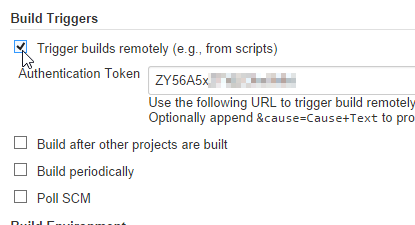
Go to the page of our project and choose “Configure” in the panel. There, in the “Build Triggers” section, we need to allow remote build triggering by enabling the “Trigger builds remotely (e.g., from scripts)” checkbox and setting a token. The token is needed so that only you can trigger the project build, and attackers or bots probing the URLs have no way to stage a DoS against you. You can generate it or make one up. The main thing is that it is long enough to rule out a lucky guess or brute forcing. There is no need to write it down, since it is always available in the job settings in plain text.
Setting up the hook in Bitbucket
Let’s go to the repository settings and pick the “Hooks” section, then create a new hook of the “Jenkins” type. You will be presented with a dialog where the following data has to be entered:
Csrf Enabled This checkbox means that protection against CSRF attacks is enabled in your Jenkins security settings. It is best to enable it in the settings and, accordingly, check this box. To do that, go to “Manage Jenkins” - “Configure Global Security” and check “Prevent Cross Site Request Forgery exploits”, then select “Default Crumb Issuer”.
Endpoint Here you need to provide the URL of your Jenkins. However, things are a bit trickier than they seem, and the token alone will not be enough if you have restricted access to the system. Building the address requires additional data from your Jenkins account. Click on your login in the upper right corner, choose “Configure” and in the “API Token” section reveal the token of your Jenkins account (not to be confused with the build job trigger token) using the “Show API Token…” button. Now we have the data needed to compose the hook URL - let’s substitute it into the standard address pattern that includes the login and password:
http://<User ID>:<API Token>@<Jenkins domain>:<Jenkins port>/So if Jenkins runs at http://my-jenkins.tld:8080/, our User ID is skobkin, and the account
token is asklasdashdkjasdkjas, we get an address of the form
http://skobkin:[email protected]:8080/Module name By default you can leave this empty. But if you wish, you can specify that commits to particular modules (directories) should trigger a build in Jenkins.
Project name Here you need to specify the name of the job in Jenkins that will be run on a commit.
Token And here you provide the token that you set in the remote job trigger settings.
A description of the settings listed above in English can be found here. Now you can save the hook and test the setup in action.
Alternatives
Repository polling
One replacement option is the “Poll SCM” option in the “Build Triggers” section of a Jenkins job. However, this method works via CRON and performs redundant work compared to the method described above.
BitBucket Plugin
In addition, you can find a plugin that allows defining arbitrary hooks with POST requests on Bitbucket. Its downside is that it does not use a token and, if access to the system is open, it may allow anyone to trigger a build regardless of repository events. Although, in the opposite case it can help provide somewhat greater flexibility.
Conclusion
This fairly simple approach lets you set up an automatic Jenkins build of a project on a Bitbucket commit. It is important to understand that the remote trigger mechanism is universal, and you will be able to set up similar actions on commits to Github without much trouble, or even trigger a build with your own script from your repository or workstation.