Opera 11 Review. Part Two
Note
This is a copy of my review written for the Softkey resources
Note
This is a historical review of Opera 11. Widgets, extensions and the links to old Opera services belong to the former ecosystem and may be unavailable.
After the browser was sold, the former team has been working on Vivaldi.
In the previous article we did not cover all the useful features of the Opera browser. Fortunately, the browser is still full of surprises, and in this article we will continue looking at its most notable features, and also examine the new features of the latest version. I am sure some of them you were not even aware of, while others may strike you as very useful. Spell checking, BitTorrent support, geolocation, tab grouping - and so on and so forth.
- Spell checking

Writing correctly just got easier: the tenth version introduced spell checking with dictionaries for many languages.
- Widgets This functionality was built into Opera in the ninth version. Widgets were small applications in windows of arbitrary style and shape that ran inside the browser and displayed information from various services. For example, the VKontakte widget and the Yandex weather widget were popular. Starting with the tenth version, widgets can be run outside the browser like ordinary applications, which made Opera widgets a more powerful and convenient tool.
- Sessions This functionality already has a truly long history, as it was added back in the second version of Opera, in 1996. Do you use the browser for work, browse entertainment sites and get lost among the tabs? Or perhaps your family members use the browser too? Sessions can help here. The set of open tabs can be saved as a session and a new one started. And when they are needed again - you can load the session and return to work or entertainment.
- BitTorrent support Added in the ninth version. This is probably the only feature in Opera that initially earned a bad reputation due to an unsuccessful implementation. The problem was that for some reason it did not work with most torrent trackers and the files simply would not download. However, the support remains and some progress is being made. Perhaps over time the built-in torrent client will become a full-fledged one.
- Search Opera has quite a lot of search capabilities, each of
which noticeably simplifies finding the information you need. Let us look at them.
- Search from the address bar In Opera you do not have to use the search field. Just type a search query into the address bar and a search will be performed in the search engine set as default for the address bar. In addition, you can use search engine shortcuts: by typing “g softkey” you will search for “softkey” in Google; typing “y softkey” will perform the search through “Yandex”. Furthermore, when working with the address bar, the search covers not only search engines but also history, bookmarks and the text of visited web pages.
- Find in page If you select find in page from the menu or press the familiar CTRL+F combination, or the period key in the English layout - you can search for words and sentences on the page. Pressing the comma in the English layout searches within links.
- Your own search In Opera you can configure any search. It is very simple to do: just go to the page with that search, right-click on the search field and select “Create search”. This way you will be able to search your favorite news site or torrent tracker.
- Geolocation Some services and websites require knowing your location in order to work. Starting with the tenth version, Opera provides geolocation capabilities. The location is determined depending on where the browser is running. If it is a GPS-equipped device, the location will be determined with high precision via GPS. Otherwise the location will be determined based on the network address. Naturally, the location cannot be determined automatically unless you specifically allow it for a particular site, so users need not worry about anyone learning their whereabouts. In addition, before using this feature Opera suggests reading the license agreement, which explains the main aspects related to it.
- Page display settings Opera allows a variety of page appearance settings: convenient zooming (introduced in the second version, scaling not only text but also media content), fit-to-width (since the eighth version), disabling images (from the very first version) and some features like object outlines that can be useful to developers or to those who research and analyze websites.
- Automatic page refresh This feature is not key, but it deserves a mention as unique. Sometimes it is useful to keep an eye on information on a changing page, for example to watch snapshots from a street web camera. Right-clicking brings up the refresh menu where you can set any interval.
- Opera Dragonfly A tool that can be useful to a narrow circle of people - developers. It noticeably simplifies debugging websites.
New features Many of the new features in the eleventh version were made at the request of the browser’s user community. For example, on the pages of the IT resource “Habrahabr” the company’s Russian representative regularly talks with the internet community and publishes press releases from Opera. It has also become a tradition to hold the regular “Opera Habra guest” event, where questions are collected in advance, then translated and answered by senior company employees. Last time these questions were answered by the developers of the Opera Desktop Team themselves. Next on the list is an interview with the company’s CEO, Jon von Tetzchner. All in all a rather sensible policy, considering that most of Opera’s already small share of desktop users worldwide is in Russia and the CIS countries. So let us see which user requests the developers responded to, what they added and what they changed.
- Tab grouping
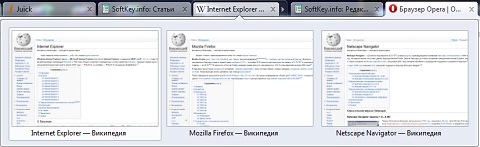
Perhaps one of the most significant changes, made on Opera Software’s own initiative without requests from users. Dragging one tab onto another creates a tab group. It can be collapsed and expanded. This innovation will be very useful to those who like to work with dozens of open tabs.
- Extension support
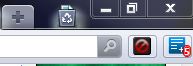
Users had been asking the developers for this for a very long time; the two main competing browsers already had this capability. Now Opera can boast of it too. Not yet at the same level as, say, Firefox, but users can already install an extension in a couple of clicks. The official extension repository of Opera already offers about a hundred and fifty extensions for various purposes. No fewer are under review and will become available for installation very soon. Extensions make certain actions in the browser easier or add new capabilities. For example, there are extensions for a translator, the LastPass password manager, a URL shortener, a web antivirus and other useful things.
- Gesture visualization Undoubtedly, an excellent innovation of earlier Opera versions was the gestures, but they were not very easy to understand and rather obscure. The user either had to read the browser’s help documentation or learn by trial and error. Now everything has changed: if you press and hold the right mouse button, the user is shown a visual menu of gestures.

Moving the mouse in different directions, the user can see which combinations are available for use. Moreover, the visualization is made so that if the user already knows the combinations and does not hold the mouse in place for long, the hints will not appear. This makes learning easier and does not get in the way of experienced users at all.
- Improved updating Now Opera’s auto-update will update not only the browser, but also Unite applications and extensions.
- New address bar
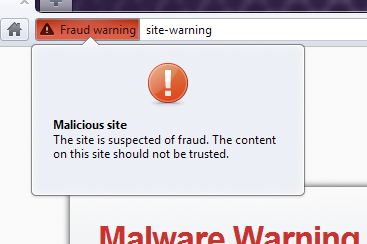
It now shows more clearly whether the site uses a secure connection, whether it is a phishing site, and displays additional information when needed. In addition, addresses are now shortened and only the bare minimum of necessary information is displayed, such as the domain and the page being requested. If the user needs to copy the address - clicking it reveals the full address, and copying poses no problems.
- Search suggestions
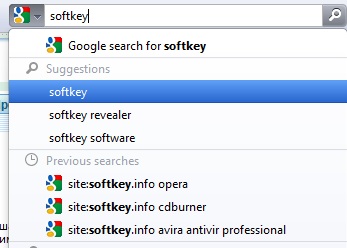
Now this convenient feature exists not only on Google or “Yandex”, but also in the browser’s address bar and search box. Something only Chrome could previously boast.
- Loading plugins only when needed Helps speed up the work of sites overloaded with media content on not very powerful computers, loading only the content the user actually needs.
Conclusion And so I have tried to introduce you to this browser. Historically, unlike other products such as Mozilla Firefox or Google Chrome, Opera was hardly advertised at all, and its popularity worldwide is small. However, I recommend giving it a try. Perhaps you will like the browser and your surfing will become more comfortable. This review was prepared for Softkey.info